
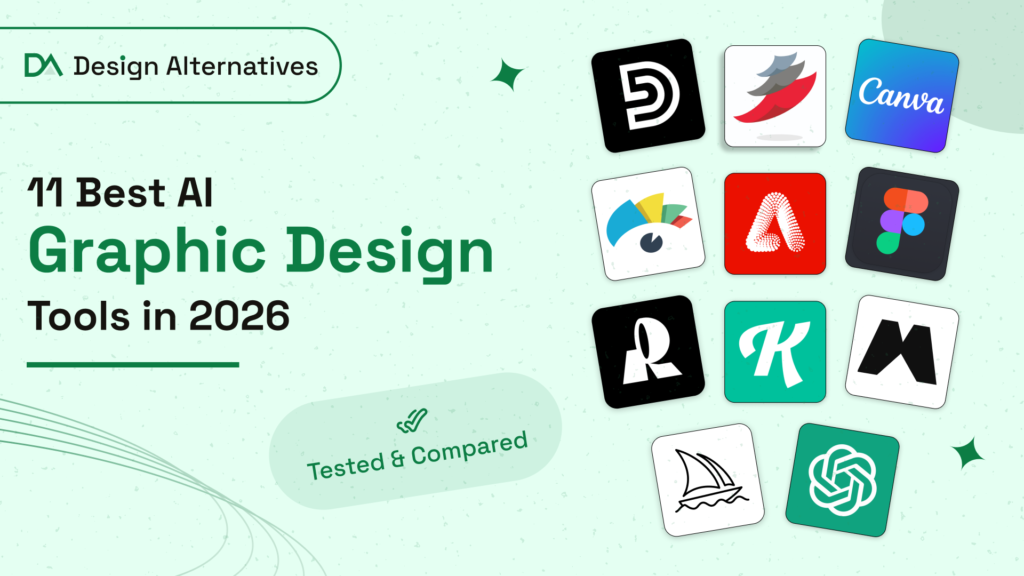
The best AI graphic design tools in 2026 are Design.com, Canva, BrandCrowd, Visme, Adobe Firefly, Figma, Recraft, Kittl, Magnific, ChatGPT and Midjourney. After testing all 11, Design.com is my top pick for businesses because it takes you from a written prompt to an edited, print-ready design in one place, with paid plans from $5/month. The right tool for you depends on whether you need editable layouts, original images, vector files or UI designs.
 Best overall
Design.com
Best overall
Design.com
Prompt to designer-made templates, AI chat editing and print-ready downloads in one flow. From $5/mo.
Read review → Best for everyday design
Canva
Best for everyday design
Canva
Conversational AI, a huge template library and hundreds of app integrations.
Read review → Best for logos
BrandCrowd
Best for logos
BrandCrowd
380,000+ designer-made logo templates with AI chat editing and free logo options.
Read review →If you have ever lost an afternoon nudging text boxes around a flyer, you already understand why AI design tools took off. Today, a social post, a business card or a full logo can start as one sentence typed into a prompt box.
And it is not just hobbyists. The AI in Design 2026 report by Designer Fund and Foundation Capital surveyed more than 900 designers in over 60 countries. Weekly AI use for design work jumped from 54% to 91% in a single year.
Source: AI in Design 2026, Designer Fund and Foundation Capital (900+ designers surveyed)
That last number stood out to me. Seven tools is a lot, and it reflects how fragmented this space has become. Some tools give you a finished, editable layout. Others only give you a picture. A few are built for vectors, typography or app screens. And the fine print on who owns what you create changes from one tool to the next.
So instead of comparing feature lists, I handed each tool the kind of job it claims to be good at and watched how it handled it. This guide is the result.
How I tested each tool
Rather than run one brief through every tool, I gave each tool the kind of project a real business would bring to it: a flyer for a food truck, a logo for a dog groomer, a client report for a bookkeeping firm, a product shot for a skincare brand and so on. Every business is fictional, but every job is one that small teams handle week in, week out.
For every tool, I looked at the same five things:
- Workflow. How many steps it took me to go from an idea to a file I could actually use.
- Output quality and editability. Whether the result was usable as-is, and whether I could change individual elements afterwards.
- Range of formats. Social, print, web, presentation, video and vector support.
- Ownership and commercial rights. What the terms say about who owns the output and where I can use it.
- Value. What the free plan really gives you and what the first paid plan costs.
What is an AI graphic design tool?
An AI graphic design tool is software that creates, edits or automates visual design from plain-language instructions. You describe what you need, and it returns a layout, an image or an edited version of an existing design.
The first thing I noticed while testing is that these tools fall into four quite different camps:
- Template-based design generators They match your prompt to professionally made templates and fill them in, so every element stays editable. Design.com, Canva and Visme work this way.
- AI image generators They create original pictures from a text description. ChatGPT, Midjourney and Adobe Firefly belong here.
- Specialist design platforms They apply AI to one discipline, such as vector art (Recraft), typography and merch (Kittl) or interface design (Figma).
- Asset and production suites They combine generation with huge stock libraries and batch workflows for high-volume teams, as Magnific does.
Knowing which camp a tool sits in saves a lot of frustration. If you need a business card you can send to a printer, an image generator will not get you there on its own. If you want a one-of-a-kind illustration, a template library will feel boxed in.
Best AI graphic design tools compared
| Tool | Best for | Pricing | Output ownership | Rating |
|---|---|---|---|---|
| Design.com | Small businesses that need logos, print and social designs, edited by chat and ready to print | Free; paid from $5/mo | Commercially safe; full logo ownership on paid plans | 4.8/5 |
| Canva | Quick everyday designs with conversational AI | Free; Pro $180/year | Yours, except library content | 4.7/5 |
| BrandCrowd | Logo-first branding with a large template library and matching brand assets | Free; paid from $13/mo | Commercially safe; extended license for exclusive use | 4.8/5 (Trustpilot) |
| Visme | Branded, data-rich and interactive content | Free; paid from $12.25/mo | Yours on all plans | 4.5/5 |
| Adobe Firefly | Commercially safe image generation | From $9.99/mo | Yours, IP indemnity on qualifying plans | 4.4/5 |
| Figma | UI, product and collaborative design | Free; full seat $16/mo | Yours | 4.6/5 |
| Recraft | Native vectors and print-ready files | Free; paid from $10/mo | Paid plans only | 4.7/5 |
| Kittl | Typography, merch and print-on-demand | Free; paid from $14/mo | Paid plans only | 4.8/5 |
| Magnific | High-volume assets and product scenes | Free; paid from $14.50/mo | Commercial license on paid plans | 4.7/5 |
| ChatGPT | Original images from text prompts | Free; paid from $8/mo | Yours on all plans | 4.6/5 |
| Midjourney | Illustration and art direction | From $8/mo | Yours, public by default below Pro | 4.4/5 |
What can each AI design tool create? Full capability comparison
Feature lists only tell you so much. What matters day to day is whether a tool actually has a template or an AI generator for the thing you need to make. I mapped 35 common design jobs against all 11 tools, from logos and flyers to reels, menus and QR codes.
✓Dedicated templates or AI tool ✗No dedicated support
| What you want to design | Design.com | Canva | BrandCrowd | Visme | Firefly | Figma | Recraft | Kittl | Magnific | ChatGPT | Midjourney |
|---|---|---|---|---|---|---|---|---|---|---|---|
| Branding | |||||||||||
| Logos AI logo generator and logo templates | Yes | Yes | Yes | No | No | No | Yes | Yes | No | No | No |
| Business cards Print-ready card designs | Yes | Yes | Yes | No | No | No | No | No | No | No | No |
| Digital business cards Shareable online cards | Yes | No | Yes | No | No | No | No | No | No | No | No |
| Letterheads Branded stationery | Yes | Yes | Yes | Yes | No | No | No | No | No | No | No |
| Email signatures HTML email sign-offs | Yes | Yes | Yes | No | No | No | No | No | No | No | No |
| Brand colors applied automatically Templates inherit your logo or brand kit | Yes | Yes | Yes | Yes | No | Yes | No | No | No | No | No |
| Social media | |||||||||||
| Social media posts Instagram, Facebook, LinkedIn, X and Pinterest | Yes | Yes | Yes | Yes | No | Yes | No | Yes | No | No | No |
| Stories Instagram, Facebook, WhatsApp and Snapchat | Yes | Yes | Yes | Yes | No | No | No | No | No | No | No |
| Covers and banners Facebook, YouTube, LinkedIn, Twitch, X, Etsy, Tumblr, Zoom backgrounds | Yes | Yes | Yes | Yes | No | No | No | No | No | No | No |
| Profile pictures and channel icons Instagram, LinkedIn, Twitch, YouTube and more | Yes | Yes | Yes | No | No | No | No | No | No | No | No |
| Short videos and reels TikTok, Instagram Reels, YouTube Shorts | Yes | Yes | Yes | Yes | Yes | No | No | No | Yes | No | Yes |
| YouTube thumbnails Video covers and thumbnails | Yes | Yes | Yes | Yes | No | No | No | No | No | No | No |
| Ads Facebook ads and display banners | Yes | Yes | Yes | Yes | No | Yes | No | Yes | No | No | No |
| Print and marketing | |||||||||||
| Flyers Event, promo and sale flyers | Yes | Yes | Yes | Yes | No | Yes | No | Yes | No | No | No |
| Posters Event and promotional posters | Yes | Yes | Yes | Yes | No | No | Yes | Yes | No | No | No |
| Brochures Folded and multi-page brochures | Yes | Yes | Yes | Yes | No | No | No | No | No | No | No |
| Menus Restaurant and cafe menus | Yes | Yes | Yes | No | No | No | No | No | No | No | No |
| Invitations and postcards Weddings, birthdays, events, postcards | Yes | Yes | Yes | No | No | No | No | No | No | No | No |
| Thank-you cards and gift certificates Small-business print extras | Yes | Yes | Yes | No | No | No | No | No | No | No | No |
| T-shirts and merch Apparel and product designs | Yes | Yes | Yes | No | No | No | No | Yes | No | No | No |
| Invoices Branded invoice templates | Yes | Yes | Yes | Yes | No | No | No | No | No | No | No |
| Business content | |||||||||||
| Presentations Pitch decks and slide templates | Yes | Yes | Yes | Yes | No | Yes | No | No | No | No | No |
| Infographics and reports Data-led visual documents | No | Yes | No | Yes | No | No | No | No | No | No | No |
| Charts and data visualization Interactive and static charts | No | No | No | Yes | No | No | No | No | No | No | No |
| Web | |||||||||||
| Websites Small-business sites with hosting | Yes | Yes | Yes | No | No | Yes | No | No | No | No | No |
| Link-in-bio pages Single-page link hubs | Yes | No | Yes | No | No | No | No | No | No | No | No |
| App and UI design Screens, wireframes and prototypes | No | No | No | No | No | Yes | No | No | No | No | No |
| Domain names Register a domain with your brand | Yes | Yes | Yes | No | No | No | No | No | No | No | No |
| AI and utility tools | |||||||||||
| AI image generator Images from a text prompt | Yes | Yes | No | Yes | Yes | Yes | Yes | Yes | Yes | Yes | Yes |
| AI background remover One-click cutouts | Yes | Yes | Yes | Yes | No | Yes | Yes | Yes | Yes | Yes | No |
| AI business name generator Brand name ideas | Yes | No | Yes | No | No | No | No | No | No | No | No |
| QR codes Branded QR codes | Yes | Yes | Yes | No | No | No | No | No | No | No | No |
| Icons Custom icon sets | Yes | Yes | Yes | Yes | No | Yes | Yes | No | Yes | No | No |
| Animations and video Animated logos, posts and videos | Yes | Yes | Yes | Yes | Yes | No | No | No | Yes | No | Yes |
| Vector file export SVG, EPS or PDF | Yes | Yes | Yes | No | No | Yes | Yes | Yes | No | No | No |
| Dedicated support (✓) | 32/35 | 30/35 | 31/35 | 19/35 | 3/35 | 11/35 | 6/35 | 9/35 | 5/35 | 2/35 | 3/35 |
Two patterns stand out. Template-first platforms like Design.com, Canva and BrandCrowd cover the widest range of everyday small-business jobs, from email signatures to invoices. Image generators like ChatGPT, Firefly and Midjourney are strong at original visuals but leave layout, print and web work to another tool. Visme and Figma fill the gaps for reports, data and product design.
Based on each tool's published features and template categories as of October 2026. Capabilities change often, so check the tool before you commit.
The 11 best AI graphic design tools in 2026
Design.com
Best for: Small business owners who need logos, print and social designs without hiring a designer
Standout feature: One prompt box that leads to finished, print-ready files you edit by chatting
Library: 1,000,000+ templates across 50+ design tools, including 500,000+ logo templates
Pricing: Free plan available · Paid from $5/mo (billed annually) · G2 rating 4.8/5
Output formats: PDF, PNG, JPG, SVG, EPS, GIF and MP4
I went into Design.com expecting another template site. I came out with a launch-ready flyer, a logo and the files to print both. It is an AI design platform aimed squarely at small businesses, and it handles everything from logos and business cards to menus, social banners, presentations, t-shirts and simple websites.
The difference I noticed straight away is how little work sits between the idea and the final file. A lot of tools leave you with a decent draft and an hour of tidying. Design.com gets you most of the way there on the first pass, then lets you finish the job by talking to it.
From prompt to print in four steps
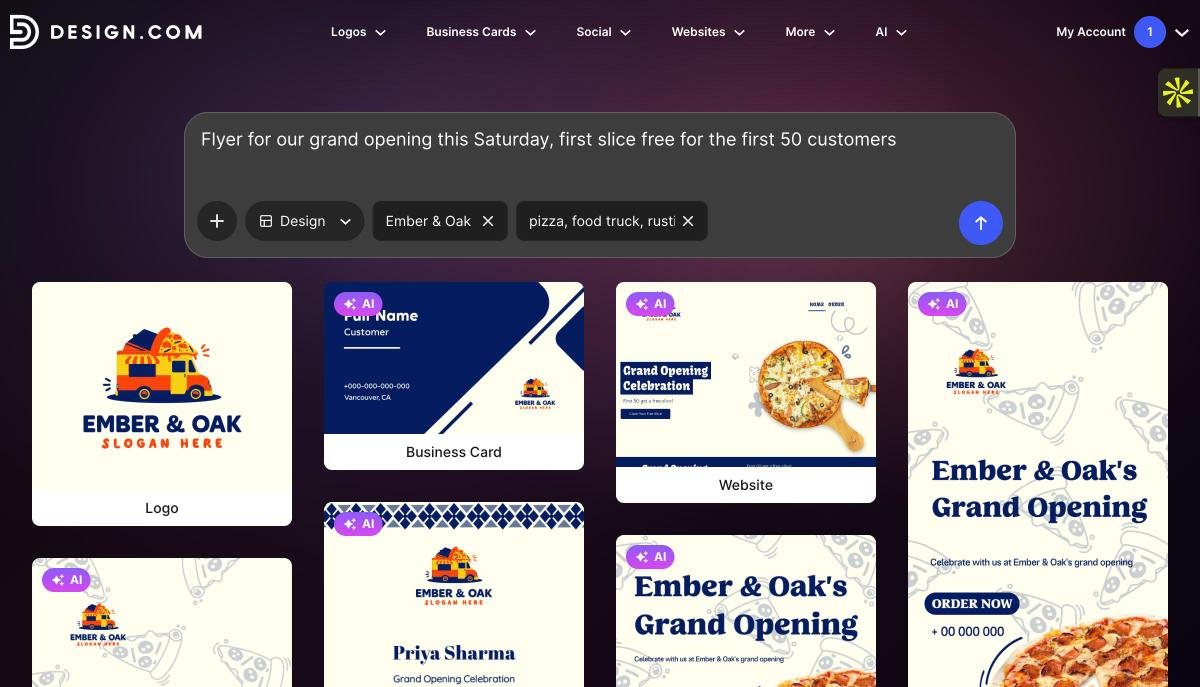
- Describe itEverything begins in a single prompt box. I typed what I wanted the way I would brief a freelancer, then added the business name and a couple of keywords about the industry. A dropdown lets you lock in the format, whether that is a flyer, a business card or a social post.
- Pick a templateInstead of one AI guess, you get a spread of matching designs with your business name already in place. These come from professional designers rather than being fully machine-made, and it shows in the balance of each layout. If you already have a logo, its colors flow into every template.
- Edit by chattingThis is where Design.com saves the most time. Rather than hunting through panels, you type requests like "swap the background to charcoal" or "make the offer text twice as big," and the design changes in place. Manual editing is there too, with 750+ fonts and 62,000+ vector shapes.
- Download or printFiles come out in SVG, EPS, PDF, PNG, JPG, GIF or MP4. Print pieces such as flyers and business cards are print-ready, and Design.com can print them for you on cards, mugs or apparel with free delivery.
My test
Business: Ember & Oak, a wood-fired pizza truck (fictional)
Prompt: "Flyer for our grand opening this Saturday, first slice free for the first 50 customers"
Business name: Ember & Oak
Keywords: pizza, food truck, rustic
AI logo creation
Since the food truck also needed a logo, I ran Ember & Oak through Design.com's AI logo generator. It does not simply reshuffle stock templates. It produces new, original logo concepts from your business name and keywords, and because the AI is custom trained on copyright-safe material, those logos are safe to use commercially.
- GenerateI typed "Logo for Ember & Oak, a wood-fired pizza truck, with a flame and an oak leaf." After about half a minute, six original AI logos appeared above the template results.
- Edit with AIThe icon and the text can each be changed through chat, so asking for "a single flame instead of two" or "a heavier slab serif" takes seconds.
- Refine by handSpacing, colors, fonts and layout are all adjustable in the editor if you want full control.
- DownloadPaid plans give you full ownership of the logo, with vector (SVG, EPS, PDF), raster (PNG, JPG) and animated (GIF, MP4) files.
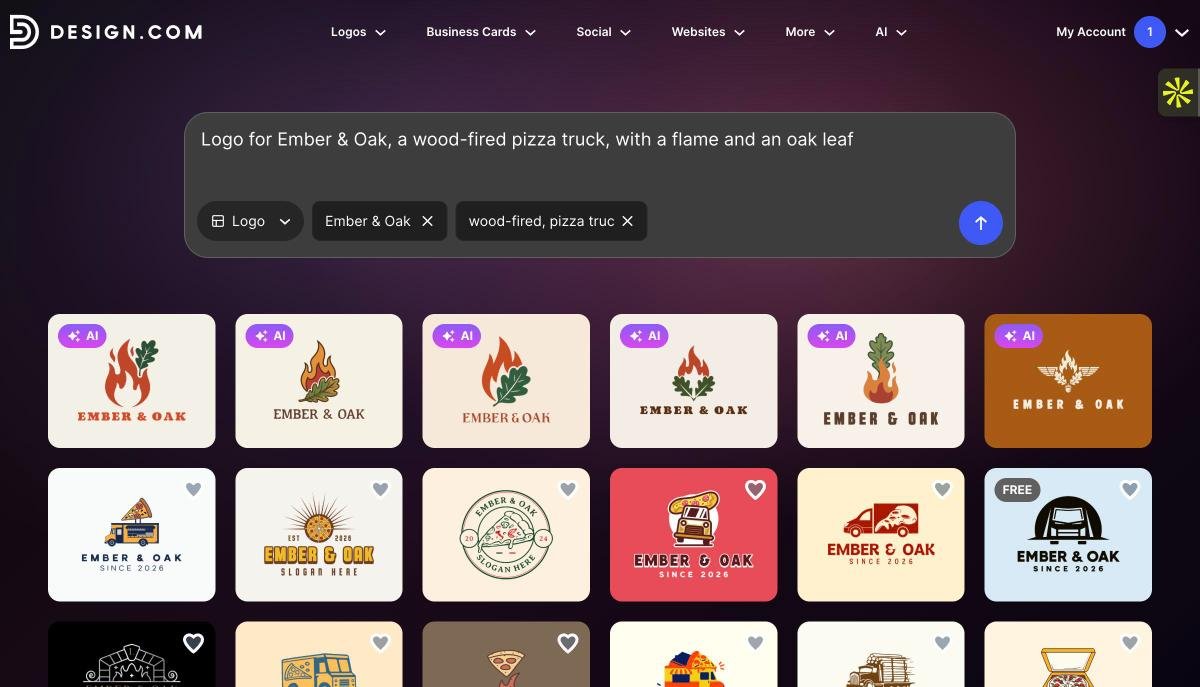
Prefer to browse first? The library holds more than 500,000 logo templates across almost every industry, from bakeries and barbers to esports teams and law firms.
The rest of the toolkit fills in the gaps a new business usually has. There are AI tools for websites, business cards, posters, presentations, business names and background removal, plus link-in-bio pages, digital business cards and domain registration. For Ember & Oak, that meant the logo, the opening-day flyer and a basic website could all live in one account.
Two smaller features I would use with a team: a shortlist for saving favorite designs, and a voting poll you can share to get quick feedback before deciding. The platform is also available in seven languages and accepts nine currencies.
Free plan: You can browse and customize designs and get 5 free AI generations or edits. Free logos, business cards and websites are available too, and downloading a free logo unlocks the website builder, link-in-bio creator and digital business card maker.
Limitations: Design.com is focused on branding and marketing visuals, so it is not the right tool for data visualization, interactive content or chart-heavy reports. Most design-tool downloads need a paid plan.
Ownership and commercial use: Every design is checked for originality and is commercially safe to use. Paid plans include full ownership of your logo with vector files, and an extended license removes a logo template from the library for exclusive use, which makes this one of the few tools here I would trust for logo and trademark work.
Pricing
- Free: Browse and customize designs, with 5 free AI generations or edits
- Starter, $5/mo: 50+ design tools, social and print templates, and full ownership of your logo with vector files
- Value, $6/mo: Everything in Starter, plus the AI website builder
- Premium, $7/mo: Everything in Value, plus link-in-bio pages and digital business cards
Prices are billed annually. Monthly billing is available at a higher rate, around $9/mo.
My bottom line: if you run a small business and need professional-looking designs across print, social and web without learning design software, Design.com is the fastest route I found.
Canva
Best for: Creators, marketers and small teams who design every day
Standout feature: Canva AI 2.0, a conversational assistant with brand memory
Pricing: Free (200 standard AI uses) · Pro $180/year · Business $250/year
Output formats: PNG, JPG, PDF, SVG (Pro), GIF, MP4 and PPTX
Canva barely needs an introduction. Canva is the design tool most people reach for first, especially people who would never call themselves designers. What has changed is the AI. Its features, once spread across Magic Studio, now live inside a single conversational assistant called Canva AI 2.0.
You describe a design and then refine it by chatting. It accepts typed, spoken or image prompts, it can read files you upload, and if you attach a Brand Kit, results come back in your colors and fonts. A Memory Library learns your style over time, and Canva Code can even build small interactive pieces like calculators.
My test
Business: Northside Climbing Gym (fictional)
Template search: "climbing gym instagram"
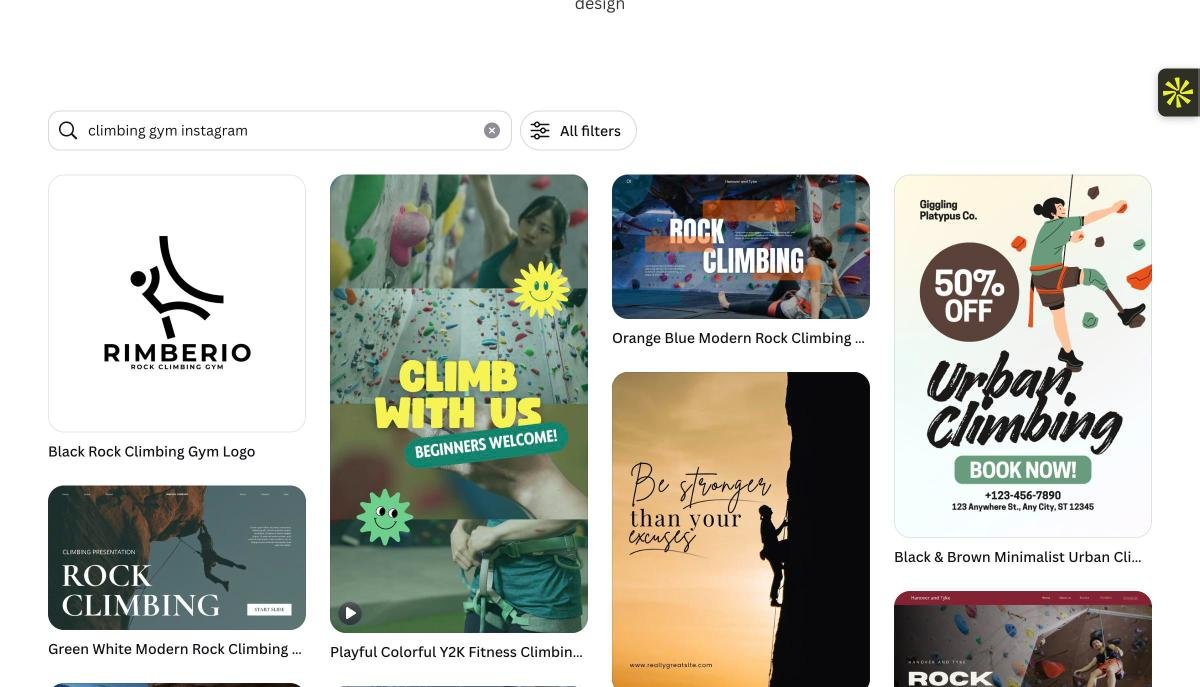
The detail I liked most is that every text box, image and graphic it generates stays separately editable, so changing one element does not wreck the layout. Add the huge template library, the stock collection and an app marketplace with hundreds of integrations, and it is easy to see why so many teams live in Canva.
Limitations: The free AI allowance disappears quickly once you start iterating, and charts and data visuals are basic compared with specialist tools.
Ownership and commercial use: Canva claims no copyright in AI output, and commercial use is allowed on free and paid plans. Output that modifies Canva library content is licensed to you, not owned.
BrandCrowd
Best for: Founders and small businesses whose first priority is a professional logo
Standout feature: 380,000+ designer-made logo templates with AI logo editing by chat
Trustpilot: 4.8/5 from 9,000+ reviews
Pricing: Free logos and templates · Premium plan $14/mo · Logo packs from $13/mo
Output formats: PDF, PNG, JPG, SVG, EPS, GIF and MP4
If your search starts and ends with "I need a logo," BrandCrowd is the most focused option I tested. Where the other tools on this list try to cover every format, BrandCrowd is built around the logo first, then helps you roll that logo out into the rest of your brand.
Its library holds more than 380,000 logo templates, all created by professional designers and exclusive to BrandCrowd, so you will not find the same mark on another platform. On top of that sit three AI tools: an AI logo generator, an AI business name generator and an AI background remover.
My test
Business: Paws & Pine, a dog grooming studio (fictional)
Business name: Paws & Pine
Keywords: dog, grooming, pine tree
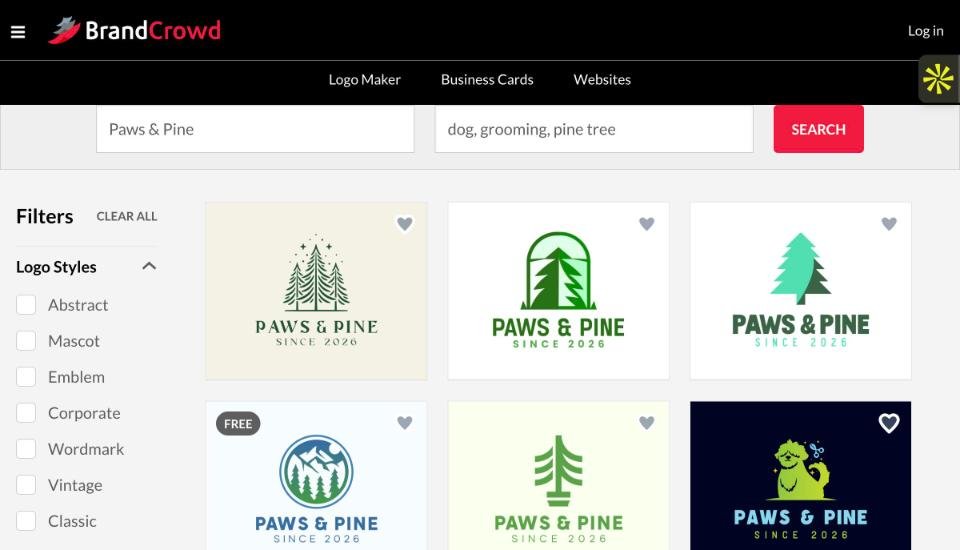
The editing is what I would point people to. You can change the icon or the text with AI through a simple chat, and because the AI is custom trained on copyright-safe material, the edits stay safe to use commercially. If you prefer working by hand, there are 750+ fonts (525+ of them exclusive) and over 62,000 custom vector shapes to play with.
Once the logo is done, BrandCrowd keeps going. Its 50+ design tools cover business cards, social posts, flyers, posters, letterheads, menus, presentations and websites, and the templates inherit your logo colors automatically. You can register a domain, order printed business cards, mugs or t-shirts with free delivery, and share a voting poll so your team can weigh in before you decide.
Free plan: BrandCrowd offers free logos, business cards and websites. Downloading a free logo also unlocks a free website builder, link-in-bio creator and digital business card maker, all of which can be published at no cost.
Limitations: BrandCrowd offers free logos, but its advanced design tools require a paid subscription.
Ownership and commercial use: Every logo and design is checked for originality and is commercially safe to use. Logos download as vector (SVG, EPS, PDF), raster (PNG, JPG) and animated (GIF, MP4) files, and an extended license removes the template from the library for exclusive use.

Visme
Best for: Marketing, sales and training teams producing branded or data-heavy content
Standout feature: 40+ chart types plus interactivity in an AI-assisted editor
Pricing: Basic free · Starter $12.25/mo · Pro $24.75/mo · Enterprise on request
Output formats: PNG, JPG, PDF, HTML5, GIF, MP4 and PPTX
Most AI design tools fall apart the moment you hand them numbers. Visme is the exception. It is a visual content platform for business teams, with more than 100 content types including presentations, documents, infographics, reports and social graphics.
Its AI hub generates complete designs from a structured prompt, an uploaded document and your brand kit. Alongside it you get an AI image generator, an AI writer, image touch-up tools, AI resize and a Brand Wizard that pulls your colors, fonts and logos straight from a website URL.
My test
Business: Ledgerly, a small bookkeeping firm (fictional)
Template category: Quarterly reports
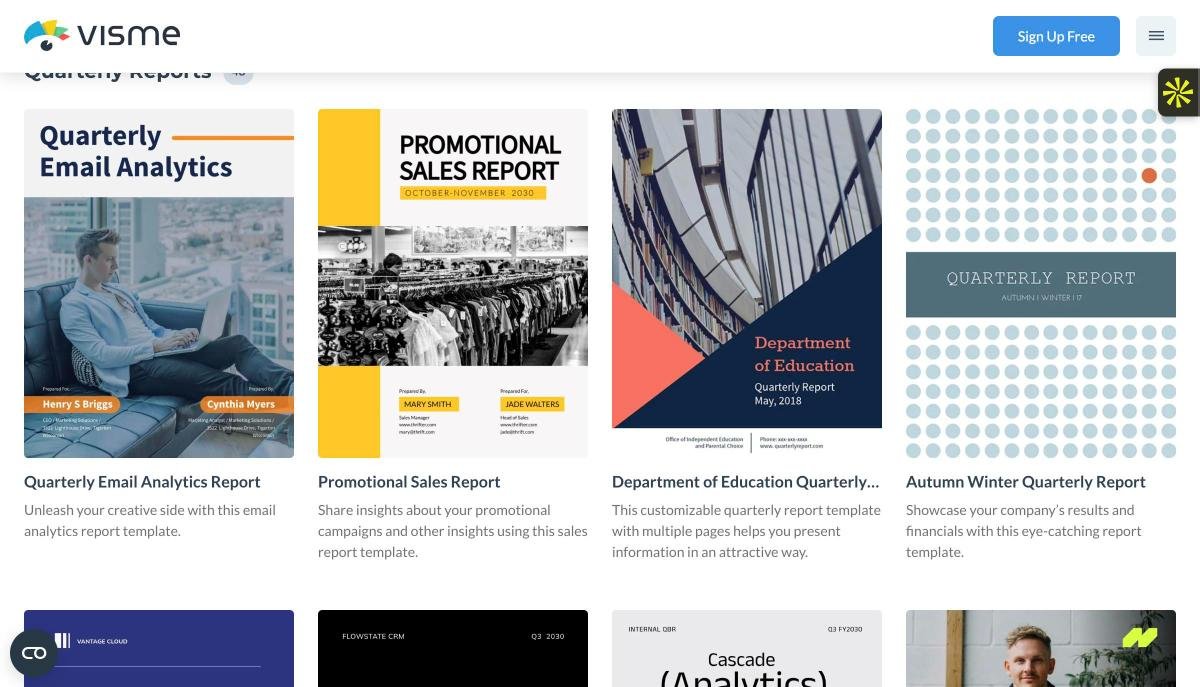
Where Visme really earns its place is depth: over 40 chart and graph types, animation, and interactive elements like hover effects and clickable buttons. If your work leans toward reports and presentations rather than social posts, it is worth a serious look.
Limitations: All that capability comes with a steeper learning curve than simpler, template-first tools.
Ownership and commercial use: You own your prompts and AI output, and commercial use is allowed on every plan. Templates and stock assets follow separate rules, with commercial use requiring Pro or Enterprise.

Adobe Firefly
Best for: Creative Cloud users and brands that need legally safer imagery
Standout feature: Commercially safe models with IP indemnification on qualifying plans
Pricing: Standard $9.99/mo · Pro $19.99/mo · Pro Plus $49.99/mo · Premium $199.99/mo
Output formats: PNG and JPG for images, MP4 for video
If your legal team gets nervous about AI images, Adobe Firefly is built for you. It is Adobe's AI creative platform, available on the web and inside Photoshop, Illustrator, Premiere and Adobe Express. Adobe trains its own models on Adobe Stock, openly licensed work and public-domain content, then attaches content credentials to anything Firefly fully generates.
Firefly now hosts more than 30 partner models too, including Nano Banana 2, GPT Image, FLUX.2 and Runway Gen-4.5. Helpfully, the model picker labels Adobe's own models as commercially safe, so you always know which is which.
One tip that will save you some confusion: generating and editing live in separate windows. Generate always creates brand-new images, so if you want to tweak one, switch to Edit, which is powered by Photoshop.
Prompt to try
Business: Saltwater Supply Co., a surf wax brand (fictional)
Prompt: "A bar of coconut surf wax resting on wet sand at golden hour, waves blurred in the background, warm natural light, room on the left for ad copy."
Limitations: Commercial safety only covers Adobe's own models. Images from partner models are not layered, which makes them hard to edit afterwards.
Ownership and commercial use: Output is yours and cleared for commercial use. Firefly is the only tool on this list that offers IP indemnification, on qualifying plans.

Figma
Best for: Product, UI and design teams who collaborate in real time
Standout feature: Figma Buzz, locked on-brand templates the wider team can edit safely
Pricing: Free · Professional full seat $16/mo · Organization $55/mo · Enterprise $90/mo
Output formats: PNG, JPG, SVG and PDF
Figma is where most product teams already work, so its AI matters more than most. There is no single "Figma AI" button. Instead, AI shows up across the platform in a few different forms.
The Figma agent generates and edits designs right on the canvas, including editable vectors for design systems. Figma Make builds working prototypes and small web apps from a prompt. And individual tools handle image generation, background removal, vectorizing and text rewriting.
My test
Business: Spinly, a vinyl record subscription app (fictional)
Community search: "music app onboarding"
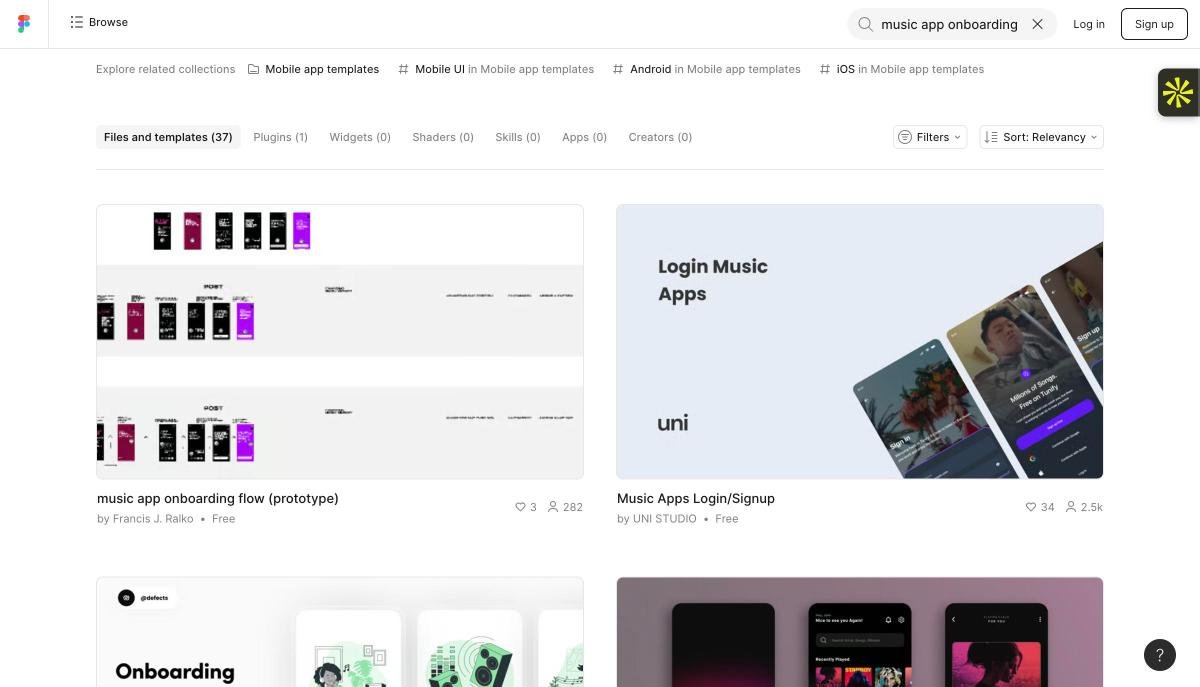
The feature I would point marketing teams to is Figma Buzz. A designer builds a template and locks everything that should not change, and the rest of the team can only edit the copy and images meant to be edited. It is a neat way to scale on-brand content without handing everyone the keys.
Limitations: Most AI features need a paid plan, and the platform is more than casual users will ever need.
Ownership and commercial use: You keep all rights to your prompts and output. On Starter and Professional plans, files may be used to train Figma's models unless an admin opts out.

Recraft
Best for: Graphic designers, illustrators and print-on-demand sellers
Standout feature: Native SVG vector generation with CMYK and custom DPI
Pricing: Free (100 credits) · Basic $10/mo · Pro from $16/mo · Teams from $18/mo
Output formats: SVG, PNG and JPG
Of everything I tested, Recraft is the one that feels made by designers, for designers. Its big trick is native vector output: you get an editable SVG straight from the prompt, not a raster image you have to trace later. It also handles CMYK color and custom DPI, so files are ready for professional print.
The workspace, Recraft Studio, pairs an AI chat panel with an infinite canvas. You can type a prompt or start from presets like vector logo, illustration, poster or photorealistic image, then ask the chat for changes.
Prompt to try
Business: Halcyon Cycles, a bike repair shop (fictional)
Prompt: "A circular vector badge logo with a bicycle wheel and a wrench crossed through it, two colors, burnt orange and navy, flat, suitable for stickers."
Limitations: Free-plan images are public in the community gallery and come with no commercial license, so the free tier is really for testing only.
Ownership and commercial use: Recraft owns free-plan output. Paid plans give you full ownership and commercial rights, which stay with you even after you cancel.

Kittl
Best for: Merch brands, print-on-demand sellers and typography-led design
Standout feature: 20+ image models on one canvas, plus background AI Workflows
Pricing: Free (200 one-time credits) · Pro $14/mo · Expert $34/mo · Max $65/mo
Output formats: PNG, JPG, PDF and SVG, plus MP4 for video
Type is where Kittl shines brighter than anything else on this list. It started as a typography and merch tool and has grown into branding, packaging, ads, social content and mockups.
Inside the canvas you can pick from more than 20 image models, including Seedream, Ideogram, Nano Banana, Imagen and the Flux family. Every generation stays on the canvas, which makes comparing options side by side easy.
My test
Business: Night Owl Bakery (fictional)
Template search: "bakery t-shirt"
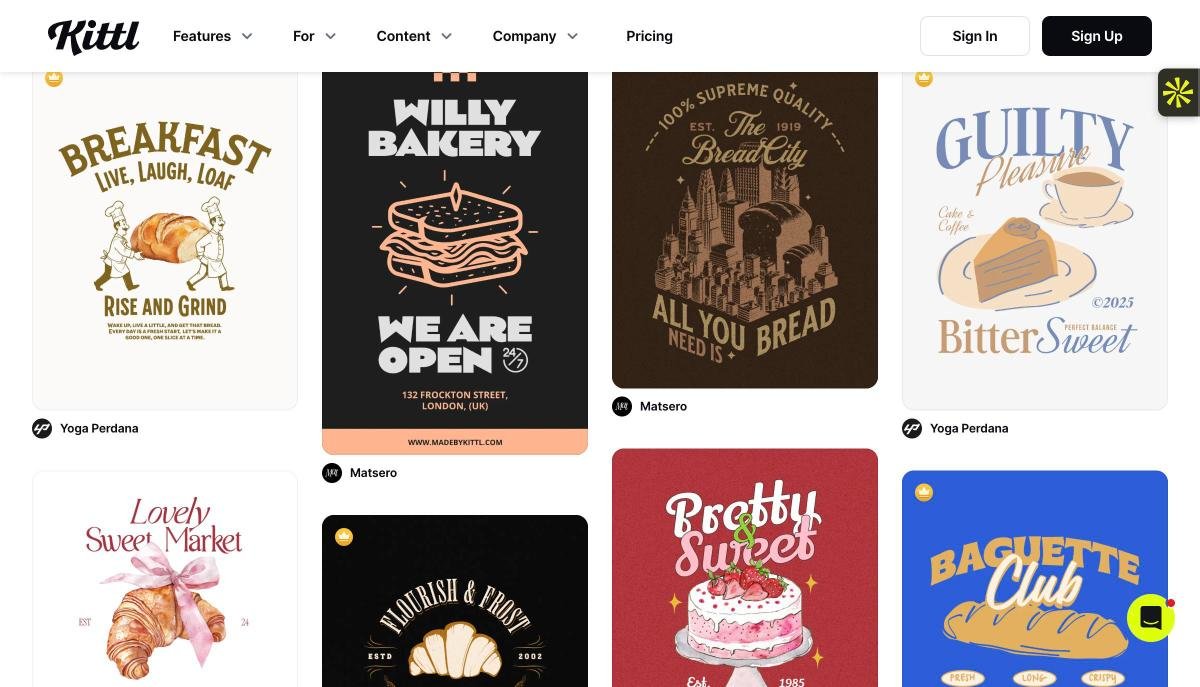
I also like Kittl's AI Workflows, which run set tasks in the background while you keep working. Examples include placing a design on a product in a real scene, changing a colorway across a range, or turning a still into a short video for a product listing.
Limitations: On the free plan, AI images are published to the community and all rights transfer to Kittl.
Ownership and commercial use: AI images are yours on Pro or Expert, with commercial use capped at 500,000 copies per design. The cap is removed on Max.

Magnific (formerly Freepik)
Best for: Agencies, e-commerce brands and high-volume content teams
Standout feature: Custom product training and node-based Spaces workflows
Pricing: Premium $14.50/mo · Premium+ $33.75/mo · Pro from $82.50/mo · Business $55/seat/mo
Output formats: PNG and JPG for images, MP4 for video
Quick heads-up if you are looking for Freepik: it now lives under the Magnific name. The platform brings roughly 30 AI tools across image, video, audio and 3D together with a stock library of over 250 million assets and around 40 third-party models.
My test
Business: Verde Skincare (fictional)
Search: "serum bottle eucalyptus stone"
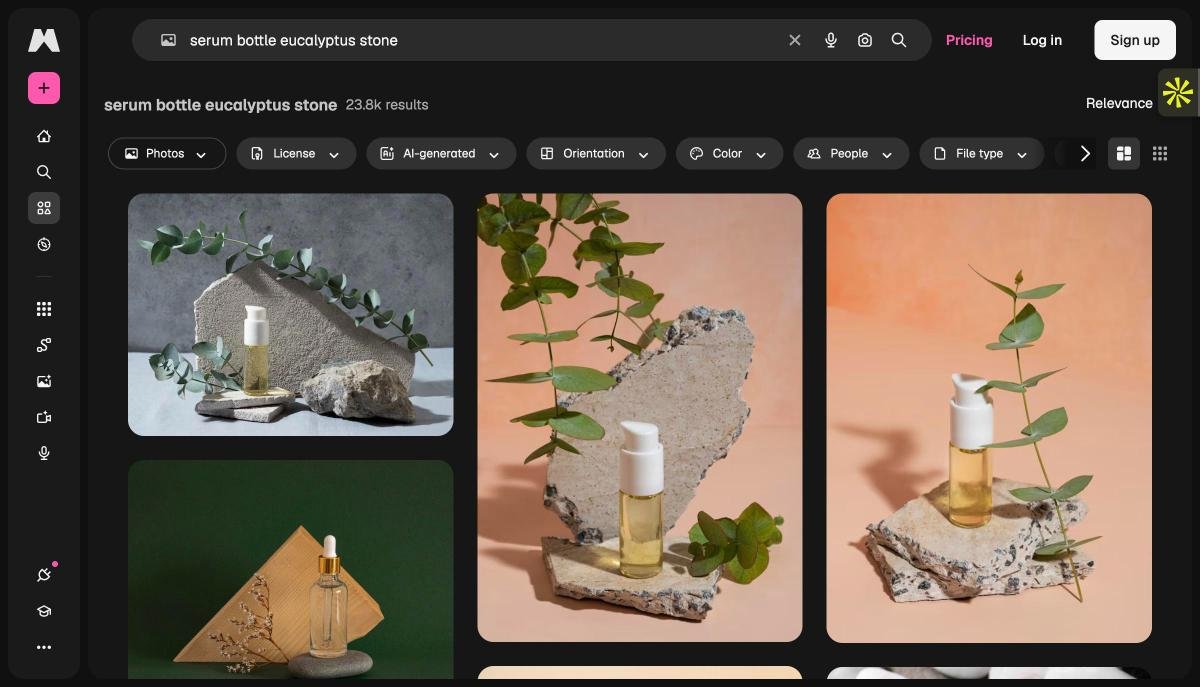
Two features make it stand out for e-commerce. First, you can train custom objects on 10 to 15 photos of your real product and drop it into any generated scene. Second, Spaces is a node-based canvas where every step, from prompt to upscale to voiceover, is a block you can save and reuse as an app for your team.
Limitations: It is overkill for presentations or documents, and Spaces takes real time to learn.
Ownership and commercial use: Paid plans include a commercial license with no attribution. The free plan is for personal use only and requires attribution.

ChatGPT
Best for: Original one-off images when no template fits
Standout feature: Detailed image generation you refine through conversation
Pricing: Free · Go $8/mo · Plus $20/mo · Pro from $100/mo · Business $20/user/mo
Output formats: PNG
ChatGPT works differently from everything above. There are no templates or layouts. You describe an image, it creates one from scratch, and you refine it through follow-up messages in the same chat.
My test
Business: Wanderleaf, a travel blog (fictional)
Prompt: "A wide watercolor illustration of a yellow tram climbing a narrow Lisbon street at sunset, for a blog header."
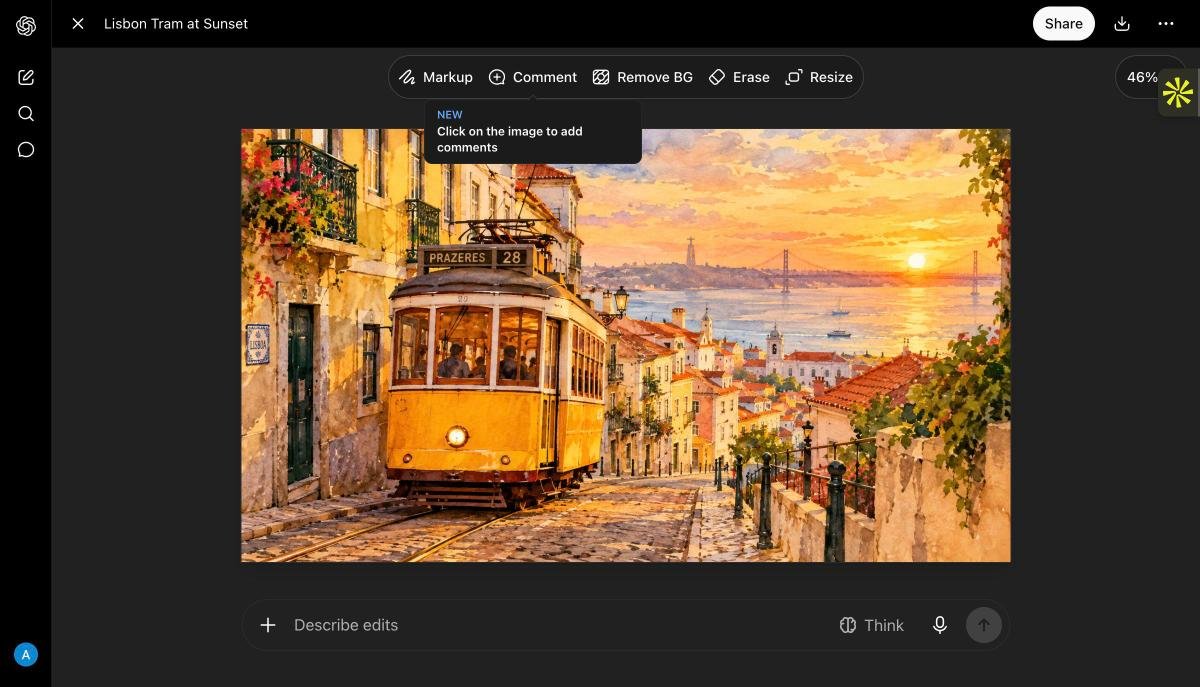
Its image quality has improved a lot, with strong detail, lighting and composition. In my workflow, it is the tool I use to create a custom hero image or illustration, which I then drop into a layout tool to add text and branding.
Limitations: You get a flat image, not an editable design, and other users may receive similar results from similar prompts.
Ownership and commercial use: You own the output, and commercial use is allowed on free and paid plans.

Midjourney
Best for: Concept art, illustration, mood boards and campaign art direction
Standout feature: Fine aesthetic control through style references and personalization
Pricing: Basic $8/mo · Standard $24/mo · Pro $48/mo · Mega $96/mo
Output formats: PNG for images, MP4 for video
When people talk about jaw-dropping AI art, they usually mean Midjourney. It is widely regarded as the leader in artistic, highly detailed imagery, and its current default model, V8.2, arrived in July 2026.
Midjourney has no free tier or trial, so instead of running my own test, I worked from its documentation and product videos.
The control it offers over style is impressive on paper. Style references, moodboards and a personalization profile steer results toward your taste, while settings like Raw, Stylize and Chaos dial its own aesthetic up or down. One catch to know about: some features, including character reference, only work on the older V7 or V6 models, which matters if you need one character to stay consistent across a series.
Limitations: No free tier or trial, no vector output and no layout tools for multi-page work.
Ownership and commercial use: You own your output on all paid plans. Everything you generate is public by default unless you are on Pro or Mega.
Which AI design tool fits which job?
After testing all 11, this is how I would match common design jobs to the right tool.
Social media graphics
Posts, stories, covers and banners sized for each platform
Logos and brand identity
Logo concepts from a business name, industry and style
Business cards and print
Print-ready cards, flyers, posters, menus and letterheads
Ads and campaign banners
Multiple layout variations for testing
Product photography
Background removal, new scenes, product placement
Presentations
Slide structure, layouts and visuals from your content
Infographics and reports
Charts and data visuals from raw numbers
Websites and app mockups
Page layouts, small business sites and interface concepts
Invitations and event materials
Themed designs for weddings, birthdays and events
Custom illustration
Original artwork when no template fits
In practice, I often pair two tools: an image generator for a one-off visual, then a template-based tool to turn it into a finished, branded design.
Free tools I use alongside them
AI handles the heavy lifting, but these small free tools are always open in my browser while I design:
- Google Fonts: a huge directory of free, open-source typefaces that are easy to add to any website.
- Unsplash: free, high-resolution photos that do not look like typical stock images.
- Noun Project: a vast icon library with a free online tier.
- Khroma: an AI color tool that learns which colors you like and suggests matching palettes.
- WhatFont and ColorPick Eyedropper: Chrome extensions that tell you the font or exact hex color of anything on a web page.
- Material Design: Google's free guidance on color, typography, spacing and grids for interface work.
How to choose the right AI design tool
Start with your most common task
If you mostly make social posts, business cards and flyers, a template-based tool like Design.com or Canva gets you to a finished file fastest. For data-heavy reports, choose Visme. For app and website interfaces, choose Figma.
Decide whether you need a design or an image
Image generators give you one flat picture. Template-based tools give you a layout where every element can be edited. Most business work needs the second.
Check where the output will end up
Printing needs print-ready files, and sometimes CMYK color or vector formats. Design.com and Recraft both handle print output directly.
Read the ownership terms before client work
Several free plans keep rights to what you generate or make it public. Recraft and Kittl claim free-plan output, and Midjourney publishes images by default below Pro. For logos, pick a tool like Design.com that offers full ownership and an extended license.
Compare the real cost
Most tools have a free tier, but AI features usually run on credits. Check how many generations your plan actually includes before you commit.
Test it with a real project
Take a real job from your to-do list and run it through two or three tools. The one whose first result needs the fewest fixes is usually your tool. Output quality is what makes a tool stick: unreliable output was the top AI challenge in the AI in Design 2026 survey.
FAQ
Frequently asked questions
What is the best AI graphic design tool in 2026?
For most businesses, Design.com is the best all-round AI graphic design tool in 2026. It turns a plain-language prompt into designer-made templates, lets you edit them through an AI chat and exports print-ready files for social media, print and web, with paid plans from $5 per month. Canva is a strong alternative for quick everyday designs, Visme for data-heavy business content and Figma for UI design.
Do I need design skills to use an AI design tool?
No. Most AI design tools are built for beginners. You describe what you need and the tool handles layout, fonts and colors. A basic sense of what looks good still helps you write better prompts and pick the strongest result.
What is the difference between an AI design tool and an AI image generator?
An AI design tool produces a complete, editable layout with text, images and branding, such as a business card or Instagram post. An AI image generator produces a single flat picture from a text description. Many people use both: a generator for a custom visual, then a design tool to build the final piece.
Can I use AI-generated designs commercially?
It depends on the tool and the plan. Design.com and BrandCrowd designs are commercially safe, with extended licenses available for exclusive logo use. Canva, Visme and ChatGPT allow commercial use on free and paid plans. Recraft and Kittl keep rights to free-plan output, and Magnific limits free-plan use to personal projects. Always check the terms before using AI output for logos, trademarks or client work.
Can I print designs made with AI tools?
Yes, as long as the tool exports print-quality files. Design.com provides print-ready downloads for business cards, flyers and posters, and Recraft supports CMYK color and custom DPI for professional printing.
Which AI design tool is best for small businesses?
Design.com and Canva are the most direct options for small businesses. Both go from a prompt to a finished, downloadable design without design experience. Design.com also includes an AI logo generator, website builder and domain registration, so several brand assets can be set up from one account, with paid plans starting at $5 per month.
Verdict
My verdict
After putting all 11 tools to work on real design jobs, my takeaway is simple: there is no single best AI design tool, only the best fit for the work you do most.
For everyday brand and marketing design, Design.com is the one I would recommend to most businesses. The Ember & Oak flyer and logo went from a blank prompt box to print-ready files faster than anything else I tried, and at $5/month it is hard to argue with. Canva is a close second for fast, everyday content, BrandCrowd is the focused choice if a logo is all you need right now, Visme is my pick for data-rich business content and Figma is the obvious choice for product teams. When I need a one-off visual, I reach for Adobe Firefly, ChatGPT or Midjourney, while Recraft, Kittl and Magnific cover more specialist needs.
Pick the tool that matches your most frequent task, read its ownership terms, and run your own test brief before you commit.
Back to the comparison table ↑Sources
Pricing, features and license terms were checked in October 2026 and may change. Every business used in the tests is fictional.